Download MapleFresh
MapleFresh HD Client
One launcher gets you the redesigned client and all game data. After that, it keeps you on the latest patch by itself.
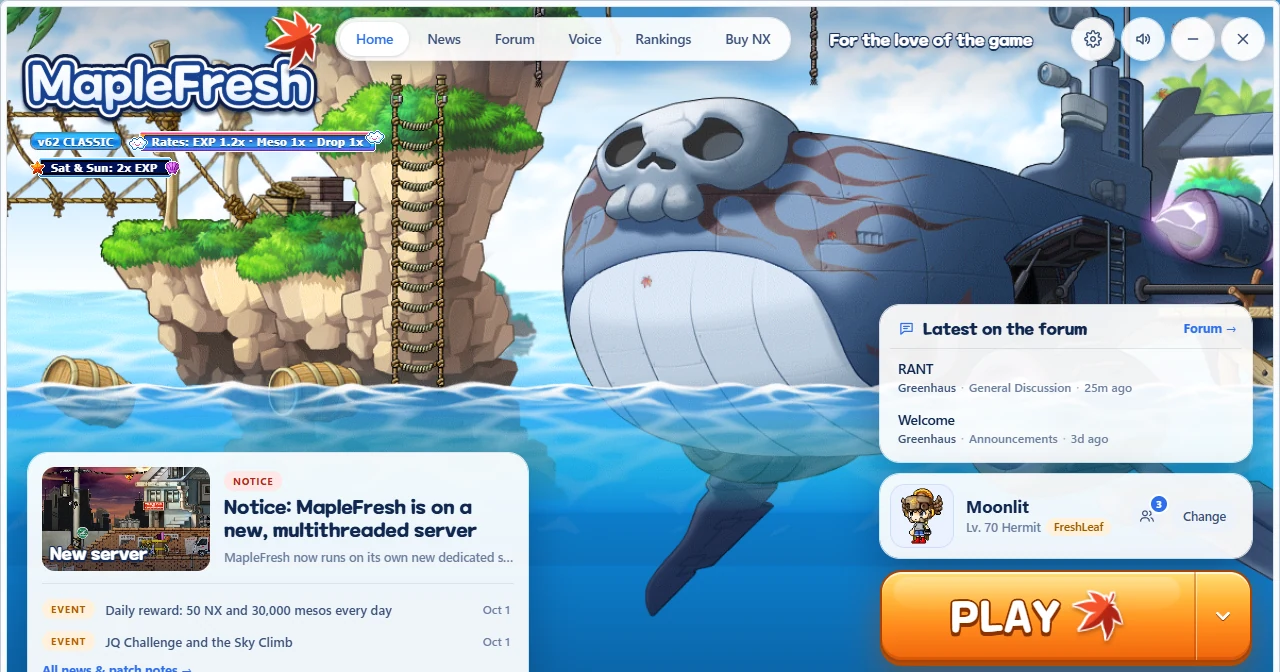 The MapleFresh launcher. News and patch notes, the latest forum posts, voice chat and one-click Play. It keeps itself and your game files up to date.
Windows · SHA-256
The MapleFresh launcher. News and patch notes, the latest forum posts, voice chat and one-click Play. It keeps itself and your game files up to date.
Windows · SHA-256 How to install
- Download the launcher
Use the orange button above. You get one file,
MapleFresh.exe: there's nothing to unzip and no admin rights are needed. If Windows SmartScreen says it "protected your PC", click More info → Run anyway. - Add an antivirus exclusion first
Windows Defender can wrongly delete the old game client (
MS.exe, a false alarm). CreateC:\MapleFresh, then add it in Windows Security → Virus & threat protection → Manage settings → Exclusions → Add an exclusion → Folder. Step-by-step help - Open the launcher and install the game
Open
MapleFresh.exe, then click the gear (top right) → Updates → Install → Install. It downloads and checks the whole game (about 1.5 GB) intoC:\MapleFresh. Want another folder? Click Change folder there first and exclude that folder instead. - Press Play
When it says Installed, the big orange button turns into PLAY. From then on the launcher keeps the game updated by itself. Tip: Settings → Launcher can put a shortcut on your desktop.
- Log in and pick a channel
Use your MapleFresh account. Don't have one yet? Create it here.
Troubleshooting
SupportSystem requirements (and Mac)
| Minimum | Recommended | |
|---|---|---|
| OS | Windows 10 (64-bit) | Windows 11 |
| CPU | Dual-core 2 GHz | Quad-core |
| Memory | 4 GB RAM | 8 GB RAM |
| Graphics | DirectX 9 compatible | Any dedicated GPU |
| Storage | 2 GB free | SSD |
On a Mac? The client is Windows-only. Some players run it through CrossOver or Whisky, but we can't officially support that.
On a Mac? Use Download for Mac above (macOS 11 or newer, Apple Silicon or Intel). Open the DMG and drag MapleFresh into Applications. The app isn't notarized by Apple yet, so the first time, right-click it → Open → Open (macOS 15 and newer: System Settings → Privacy & Security → Open Anyway). It runs the Windows client in its own built-in compatibility layer and downloads the game on first launch, so you don't need CrossOver or Whisky. The Mac version is new: if something doesn't work, post in the Help & Support forum.
My antivirus blocked or deleted the game (MS.exe keeps getting flagged)
This is a false positive. The v62 game client uses old-style protection and patching that antivirus programs flag as "potentially unwanted", even though there's no virus in it. Exclude your game folder once and it won't be flagged again:
- Open Windows Security → Virus & threat protection → Manage settings.
- Scroll to Exclusions → Add or remove exclusions → Add an exclusion → Folder.
- Pick your game folder (normally
C:\MapleFresh; the launcher shows it under Settings → Updates). - Already deleted? Go to Virus & threat protection → Protection history, open the
MS.exeentry → Actions → Restore. Or open the launcher → Settings → Updates → Install: it downloads just the missing files again.
Prefer a command? Open PowerShell as administrator and run (change the path to your folder):
Add-MpPreference -ExclusionPath "C:\MapleFresh"Using another antivirus (Avast, AVG, Norton, McAfee...)? Add the same folder to its "exceptions" or "exclusions" list. Only exclude the folder you installed MapleFresh into, and only download the launcher from this page.